
Recipe Box is a free sample HTML app (four pages, six recipes and a saved-favourites list) built to show exactly what a project needs before it becomes an Android APK. It's 43 KB as a ZIP, uses no frameworks and no files from other websites, and works with no connection. We built it into an app and tested every screen on a real phone, so you can start from something that's known to work.
If you're new to the process, the complete HTML to APK guide explains every step. This page is the hands-on companion: a real project to practise with.
What's inside the ZIP
recipe-box/
├── index.html        home: search + recipe cards
├── recipe.html       one recipe (recipe.html?id=pancakes)
├── saved.html        recipes saved on the phone
├── about.html        about page
├── css/
│   └── style.css     all styles, colours at the top
├── js/
│   ├── data.js       the recipes (edit this one)
│   └── app.js        app logic, plain script
├── img/
│   ├── *.webp        six recipe images
│   └── app-icon.png  512 × 512 icon for the converter
└── README.txt
index.html sits at the top of the ZIP, where converters look for it. Every page links to the others with relative paths, so the structure survives being packed into an app. The project structure guide explains why that matters.
Every rule, and where it's applied
| Rule | In Recipe Box | Why |
|---|---|---|
| Viewport tag on every page | All four HTML files | Mobile-ready guide |
| Fluid layout, no fixed widths | max-width: 960px + an auto-fill grid | Fits any phone without sideways scrolling |
| 16px text, 48px tap targets | Every link, button and the search box | Readable and thumb-sized |
| No hover-only menus | "More" is a <details> menu that closes on an outside tap | Touchscreens have no hover |
| Wide content contained | The nutrition table scrolls in its own box | The page never wobbles |
| Nothing from other websites | System fonts, local images, no CDN scripts | Works offline (bundled vs live) |
| Plain scripts, not modules | data.js and app.js as ordinary <script> tags | Also works in converters that load files from file:// |
| Data that survives restarts | Saved recipes in localStorage | Kept between launches |
| Small images | WebP, 640 × 400, about 5 KB each | Keeps the APK small |
Tested as a real app on a phone
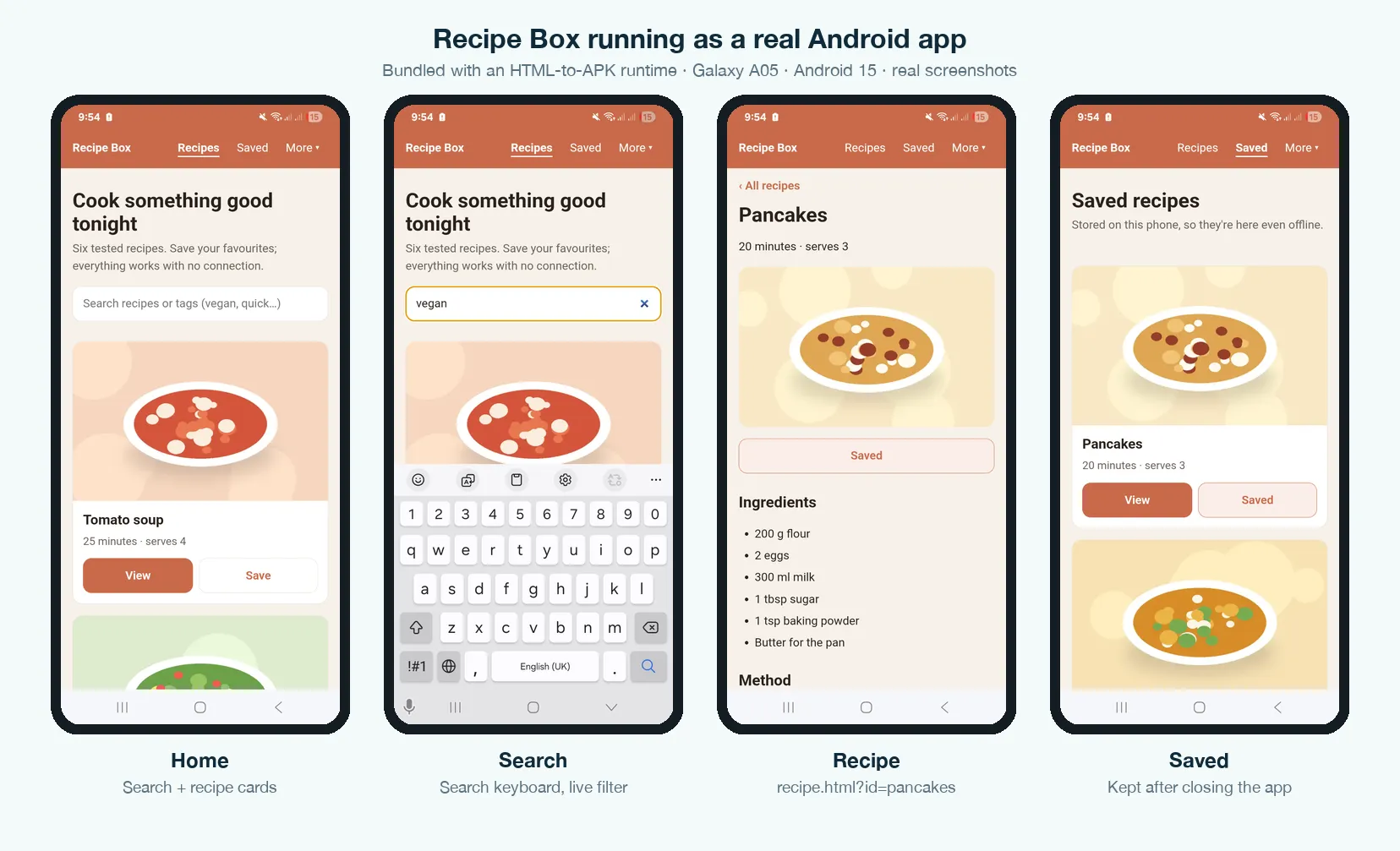
We bundled Recipe Box into an Android app with the same runtime this site uses and installed it on a Samsung Galaxy A05 (Android 15). Every tap below was a real tap on the screen.
| Test (Galaxy A05) | Result |
|---|---|
| Layout width / sideways scroll | 384 px (the phone's width) / none on any page |
| Tap targets smaller than 48 px | 0 |
| Search "vegan" | 3 recipes, filtered as you type |
| Save two recipes, close the app completely, reopen | Both still saved |
| All four pages with the network cut | All load, all images shown |
| Size added to the APK | 47 KB |
| App start after the first launch | About 0.8 s to the first screen |
The phone caught a bug the desktop browser didn't. On the recipe page, the "Saved" button turned into white text on a pale background, almost invisible. The button carried two styles at once (primary, and pressed), and the pressed style won only the background. One CSS line fixed it, and the download includes the fix:
.btn.primary[aria-pressed="true"] { color: var(--brand); }
It's a small example of why we test on a phone before publishing anything: states you rarely look at on a desktop are the first thing a user taps.
How to make it yours
- Change the content. Every recipe lives in
js/data.js. Edit, add or remove objects like this one, and the cards, recipe pages and search update by themselves:{ id: "tomato-soup", name: "Tomato soup", time: 25, serves: 4, img: "img/tomato-soup.webp", tags: ["soup", "vegan"], ingredients: ["800 g ripe tomatoes", "1 onion", "..."], steps: ["Chop the onion and garlic...", "..."], nutrition: { kcal: 180, protein: 5, carbs: 24, fat: 7, fibre: 4, salt: 0.9 } } - Change the colours. They're all at the top of
css/style.css. Set--brandto your colour, and dark mode follows automatically. - Swap the images. Add your own to
img/, ideally WebP at about 640 × 400, and pointimgat them indata.js. - Rename it. Change "Recipe Box" in the four HTML files, and replace
img/app-icon.pngwith your own 512 × 512 icon.
Want something other than recipes? The same structure works for a product catalogue, a menu, a set of guides or a phrasebook. Rename the fields in data.js and adjust the two templates in app.js.
How to turn it into an APK
- Open the folder and select everything inside it (not the folder itself), then zip it.
index.htmlmust be at the top level of the ZIP. - Upload the ZIP to an HTML-to-APK converter and choose "bundled" or "offline" content. It's a self-contained app.
- Use
img/app-icon.pngas the icon, set a splash colour that matches the header (#c96a4a), and pick a package name you'll keep forever. - Build, install the APK on your phone, and run through the same checks as our table above.
The ZIP to APK guide covers each step in detail, and the splash screen guide explains why matching the splash colour to the header makes the app feel faster.
Licence
Recipe Box is free to use, change and publish in your own apps, commercial or not, with no attribution needed. The recipe images were drawn for this project.